Song Reader keeps your sheet music with you everywhere, without carrying paper. Photograph
each page with your phone's camera, and the app scrolls through the song automatically during
play, so there's no more turning pages by hand. A companion
Song Reader Manager also lets you prepare songs on a
computer, and there's a short video
tutorial if you'd rather watch than read.
Creating a song
From the main screen, tap Create song and give it a name and (optionally) a
folder. Add pages either by taking a photo directly in the app or by importing existing
pictures from your SD card, handy if you already have scanned sheet music. Reorder, edit, or
delete pages from the song's page list at any time.
Defining fragments
Use the edit tool to drag-and-drop fragments on each page. These are the segments that get
connected and played back seamlessly. The app understands common musical repeat structures like
|: … :| repeats, coda, D.S. al coda and D.C. al coda, including multiple repeat
endings.
Playing a song
Open any song from the main screen and tap play. Standard transport controls (play/pause,
jump to start, step back/forward one fragment, jump to end) sit alongside adjustable tempo and
zoom, with the current position always shown in the title bar. Swipe with your finger to move
around freely during playback.
Deleting a song
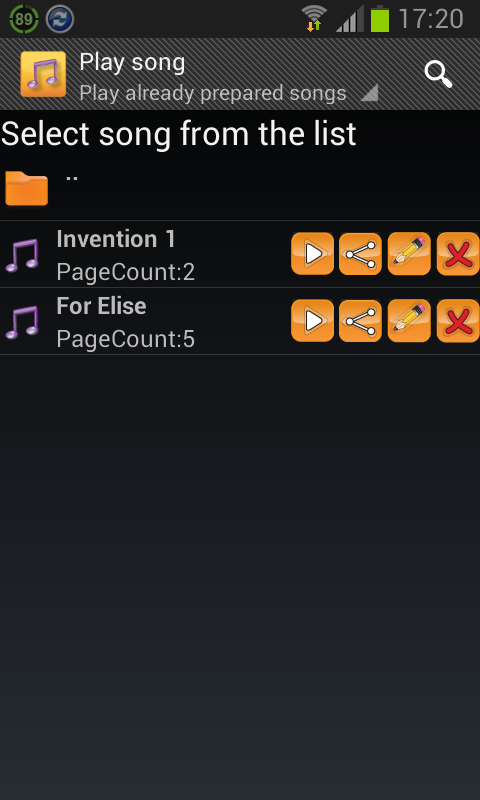
Remove a song with the delete icon from the song list (delete all songs in a folder before
removing the folder itself, and Song Reader will warn you if the folder still has songs in it).
Sharing a song
The Pro version supports sharing songs as files straight from the share icon. Received a
shared song from someone else? Open the file and Song Reader will ask which directory to save
it into.
See the privacy policy for details on data handling.